Appearance
Parking Lots
WebWorkstationUse Admin > ZynoTalk > Parking Lots to create parking lots where you can place callers on hold and retrieve them from another phone.
Admin Access required
Only ZynoTalk administrators should create or edit parking lots.
Current ZynoTalk Platform
This screen appears only for organizations using the current ZynoTalk calling platform. If you do not see it, your organization may be on a legacy voice setup or the feature may not be enabled.
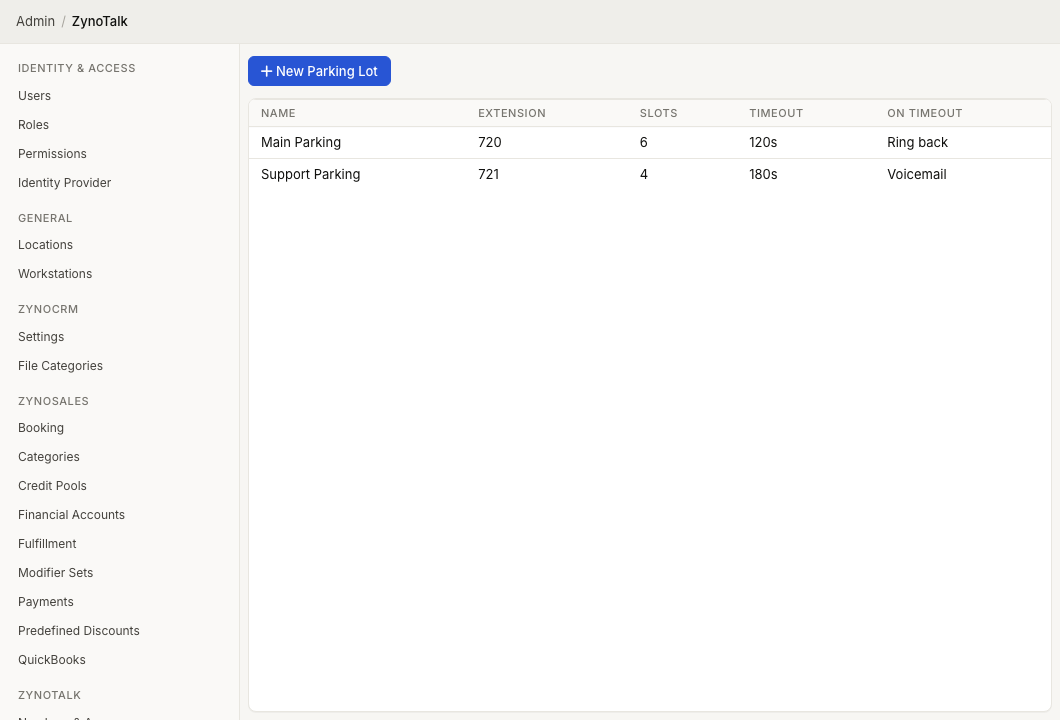
Page layout
The Parking Lots table shows:
- Name
- Extension
- Slots
- Timeout
- On Timeout
Select a parking lot to edit it. Open the row context menu to edit or delete a parking lot.
Create a parking lot
- Open Admin > ZynoTalk > Parking Lots.
- Select New Parking Lot.
- Enter a Name.
- Enter the parking lot Extension.
- Set the number of Slots.
- Set the Timeout in seconds.
- Choose what should happen On Timeout.
- Optionally enable Caller redirect, then choose its key and destination.
- Choose the Hold Media.
- Select Create.
Timeout actions
| Action | Result |
|---|---|
| Hang up | Ends the call when the timeout is reached. |
| Route to | Sends the caller to a selected extension, ring group, call flow, parking lot, AI agent, or voicemail mailbox. |
After choosing Route to, select the target type and target. The destination must belong to the same organization. If it is deleted or unavailable when the timeout occurs, the parked call ends.
When a call reaches a parking lot from a call-flow parking step that has its own timeout route, the call flow takes priority. The parking lot's timeout destination is used for direct parking and for call-flow parking steps without their own timeout route.
Caller redirect
Enable Caller redirect to let a waiting caller press one key to leave the parking lot. Choose a key from 0–9, *, or #, then choose a target type and destination. Destinations can be extensions, ring groups, call flows, other parking lots, AI agents, or voicemail mailboxes in your organization. A lot cannot redirect to itself.
The key works during entry audio and hold audio. Other keys leave the caller waiting without restarting the timeout. To tell callers which key to use, include that instruction in your parking audio.
The setting applies to calls parked by transfer or direct inbound routing, and to call-flow parking steps without their own digit routes. A parking step with digit routes uses those call-flow routes instead. Changes apply the next time a caller enters parking; callers already waiting keep the key and destination they entered with.
After the caller presses the key, the old slot becomes available and the call continues to the selected destination. If staff retrieve the call first, the retrieval takes priority. If the destination is no longer available, the call ends. Disable Caller redirect to remove both the key and destination.
Hold media
Parking lot hold media can use:
- Ring tone.
- Uploaded audio.
- Audio URL.
- Greeting.
- Text-to-speech.
Common issues
| Problem | What To Check |
|---|---|
| The parking lot cannot be saved | Confirm the name, extension, timeout, hold media, and any timeout or caller redirect destination are complete. |
| Callers do not reach the timeout destination | Confirm Route to, the target type, and the target are selected. For voicemail, confirm the selected extension has voicemail enabled. |
| A call follows the call flow instead of the parking lot timeout route | A timeout route on the call-flow parking step takes priority. Remove or change that route in the call flow if the parking lot should control the destination. |
| The caller redirect key does nothing | Confirm Caller redirect is enabled and both its key and destination are saved. Re-enter parking after changing the setting. Check whether the call-flow parking step has its own digit routes. |
| Staff cannot find parked calls | Confirm the parking lot extension and slot count are documented for staff. |